
Captain's Brief · Sea Tools · 20 min read · Oct 5, 2026
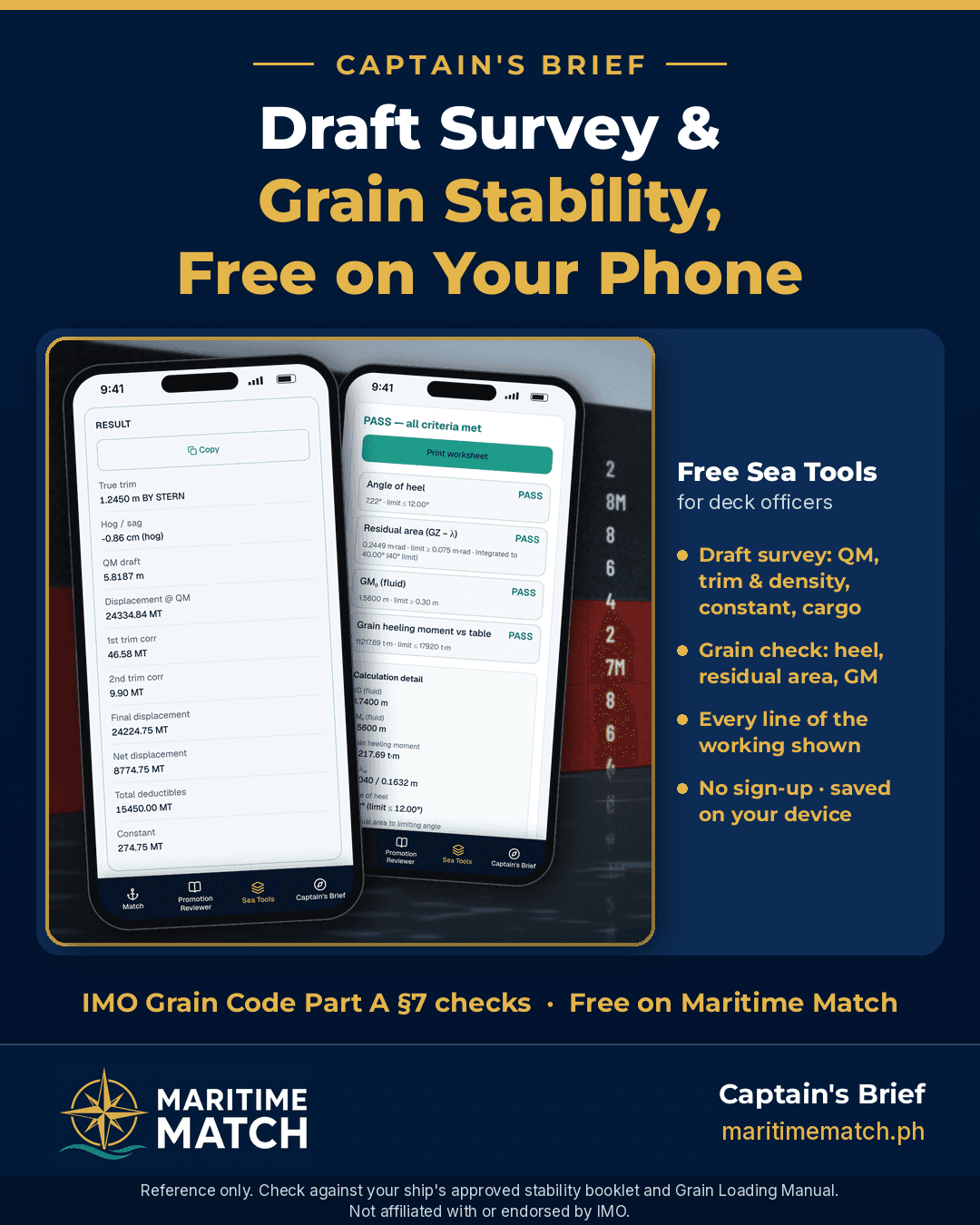
Free Draft Survey and Grain Stability Check: Work Your Cargo Figures on Your Phone
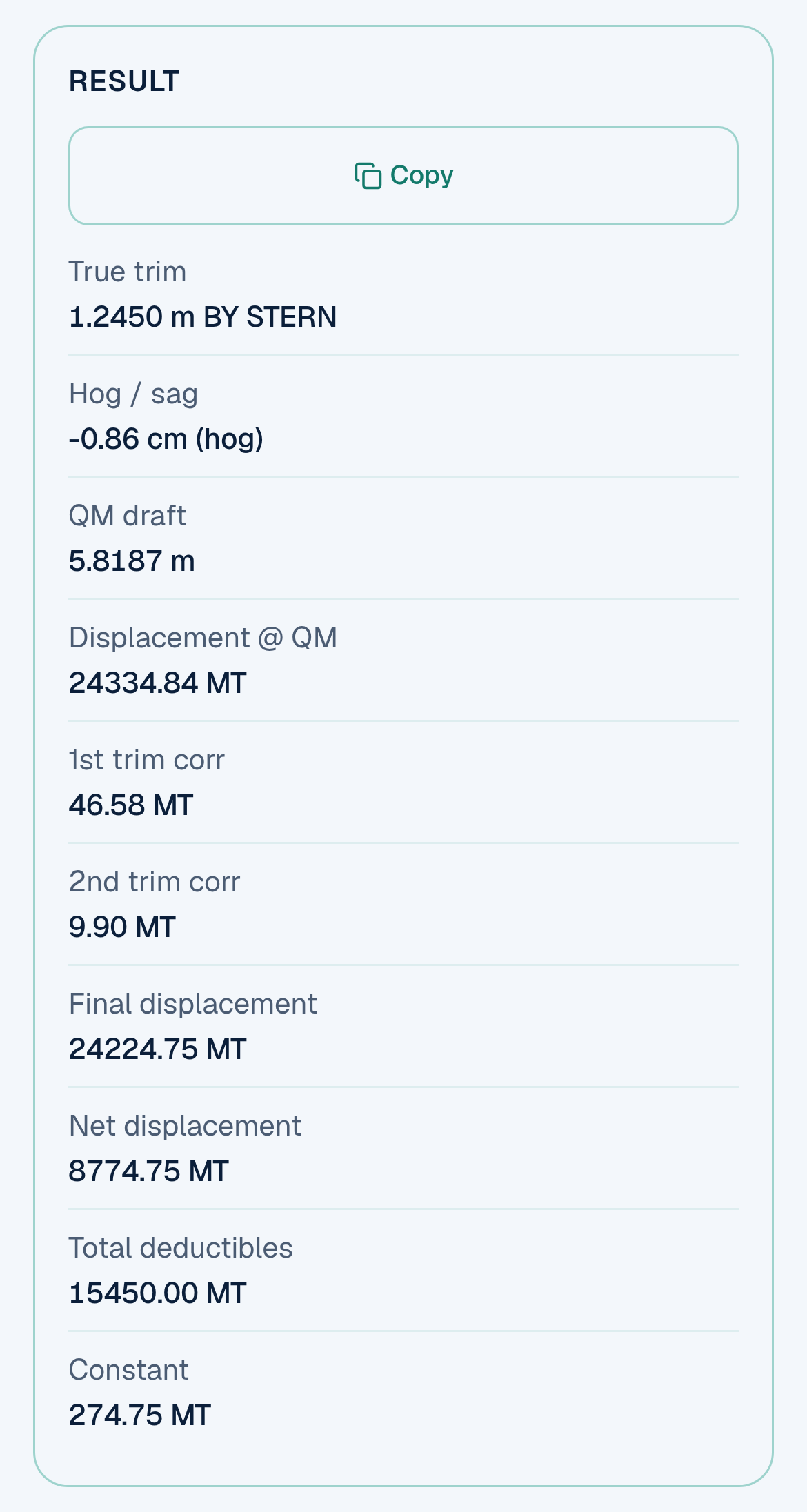
The draft survey Result panel with the example figures from this guide. It updates as you type.
If you've sailed on a bulk carrier, you know the feeling. The surveyor is waiting on deck, the ballast soundings are still coming in, and you're working the draft survey on a pad of paper with a calculator that's seen better days. One wrong sign on a trim correction and your cargo figure is off by tens of tonnes. Before a grain voyage, it's the same story with the stability check: KN values, heeling moments and a curve you have to draw by hand.
Maritime Match now has two free Sea Tools for this work: the Draft survey worksheet inside the Sea Calculator, and the Grain Stability Check. Both run in your phone's browser, show every step of the working, and are free for every seafarer.
Quick answer: Both tools are free at maritimematch.ph/sea-tools, with no sign-up.
The Draft survey (Sea Calculator → Draft survey) takes your six draft readings, mark distances, hydrostatic data and deductibles. It works out the quarter mean draft, the first and second trim corrections, the density correction, net displacement, and then the constant (initial survey) or the cargo loaded or discharged (intermediate or final survey). Every line of the working is shown.
The Grain Stability Check takes your loading condition, the KN curve and each hold's volumetric heeling moment from the ship's grain booklet. It shows PASS or FAIL against the three stability criteria in IMO International Grain Code Part A, section 7: angle of heel no more than 12° (or the deck-edge angle if less), residual area at least 0.075 m·rad, and GM at least 0.30 m. It also checks your booklet's allowable heeling moment table, if you enter one.
Your entries are saved on your device only. These are worksheets to check your own figures. They do not replace your ship's approved stability booklet, Grain Loading Manual, loading computer or the surveyor.
Why I built Sea Tools
I built Sea Tools because I wanted free tools every seafarer could reach for, with no sign-up, no fees and no hunting for an app. They have to be reliable, so every step of the working is shown and you can check it against your ship's booklet line by line. And they have to be handy, open on your phone on deck, in the cargo office or at home while you study for your next licence.
Key terms, explained simply
You'll meet these words in both tools. Here they are in plain language, the way you'd explain them to a cadet on the bridge wing.
Draft survey. A way of finding out how much cargo was loaded or discharged by measuring how deep the ship floats. You read the drafts, find the ship's displacement from her hydrostatic tables, take away everything on board that isn't cargo, and compare the result before and after cargo work. The difference is the cargo.
Draft marks and perpendiculars. The draft marks are painted on the hull forward, amidships and aft, on both sides. The hydrostatic tables, though, are drawn up for the forward perpendicular (FP), midships and the aft perpendicular (AP), which are usually not where the marks are. So each mean draft has to be "moved" to its perpendicular. That move depends on how far the mark is from the perpendicular, and on the trim.
Trim. The difference between the aft and forward drafts. If the stern is deeper, she is trimmed by the stern; if the bow is deeper, she is trimmed by the head. Trim read straight off the marks is the apparent trim. Trim at the perpendiculars is the true trim, and that is the one used for the corrections.
Hog and sag. A loaded hull bends a little. If the midship draft is less than the average of the forward and aft drafts, the ship is hogging (bent upwards in the middle). If it's more, she is sagging. The tool shows this in centimetres.
Mean of means and quarter mean. Because the hull bends, you can't just average forward and aft. The mean of means gives the midship draft extra weight. Going one step further gives the quarter mean (also called the mean of mean of means): (FP + 6 × Mid + AP) ÷ 8. This is the draft you enter the hydrostatic table with.
TPC, LCF and MTC. Three values from the hydrostatic table:
- TPC (tonnes per centimetre) is how many tonnes it takes to sink the ship one more centimetre.
- LCF (longitudinal centre of flotation) is the point the ship trims about. The tool measures it from midships, positive towards the stern.
- MTC (moment to change trim one centimetre) is what it takes to change the trim by 1 cm.
First and second trim corrections. The hydrostatic table assumes the ship is on an even keel. When she is trimmed, the displacement read at the quarter mean needs correcting.
- The first trim correction uses the true trim, the LCF and the TPC.
- The second trim correction (often called the Nemoto correction) uses the change in MTC between half a metre above and half a metre below the quarter mean. It's small, and always adds weight when MTC increases with draft.
Density correction. Hydrostatic tables are usually made for sea water of 1.025 t/m³. In a river port or estuary, the dock water is lighter, so the ship floats deeper for the same weight. You correct by multiplying the displacement by dock density ÷ table density.
Deductibles. Everything on board that is not cargo and that changes between surveys: ballast, fresh water, fuel oil, diesel/gas oil, lube oil and any other weights you can measure. You take them away from the displacement to get the net displacement.
Lightship and constant. Lightship is the weight of the empty ship as built. The constant is the weight on board that you can't sound or measure directly: stores, spares, sludge, mud in the tanks, crew and effects. In the initial survey, constant = net displacement − lightship. That constant (or the initial net displacement) is then carried into the final survey to find the cargo. The constant should come out as a sensible positive figure. If you get a negative constant on a real ship, something is wrong: recheck the soundings, the dock water density, the drafts and the hydrostatic figures.
Keel plate thickness. Draft marks are usually measured from the underside of the keel, but hydrostatic tables are usually drawn up to the moulded line, which is the top of the keel plate. Standard draft-survey practice takes the keel plate thickness away from the drafts you read, so they match the table. Your ship's plans or hydrostatic booklet say whether this applies.
Grain shift. Bulk grain settles during a voyage and leaves a void under the deck. When the ship rolls, the grain surface can slide to one side and stay there. The shifted weight gives the ship a permanent list. That's why grain has its own IMO code.
Volumetric heeling moment (VHM) and grain heeling moment. For each hold, the ship's grain booklet gives a VHM in m⁴: the volume of grain assumed to shift, times how far it moves sideways. Divide the total VHM by the stowage factor (m³ per tonne of your grain) and you get the grain heeling moment in tonne-metres. The Grain Code adds a margin for the grain surface also moving up and down: × 1.06 for filled holds and × 1.12 for partly filled holds. Your grain booklet shows how these factors are handled for your ship.
Heeling arm (λ). The heeling moment divided by the displacement gives the heeling arm λ₀ at upright. The Grain Code lets you draw it as a straight line that falls to 0.8 × λ₀ at 40° (λ₄₀).
KN curve. The ship's cross curves of stability. For a given displacement, KN is the righting lever the ship would have if her centre of gravity were at the keel, listed at each angle of heel. You find it in the stability booklet.
GZ (righting lever). The real righting lever at each angle: GZ = KN − KG × sin(angle). Here KG is the "fluid" KG, which includes the free-surface effect of slack tanks. Plotting GZ against the angle gives the stability curve.
GM. The initial metacentric height, KM − KG (fluid). It tells you how stiff the ship is at small angles.
Angle of heel (from grain shift). The angle where the GZ curve meets the heeling arm line. That is how far the ship would list if the grain shifted as the Code assumes.
Residual area. The area between the GZ curve and the heeling arm line, from the angle of heel up to whichever comes first: 40°, the flooding angle, or the angle where GZ is furthest above the heeling arm. It's measured in metre-radians. It's the "reserve" of stability the ship still has after the grain shift.
Part 1: The Draft survey, step by step
Open maritimematch.ph/sea-tools, tap Sea Calculator, then Draft survey. The page opens with example values already filled in, so you can see a full working before you type anything. Results update as you type.
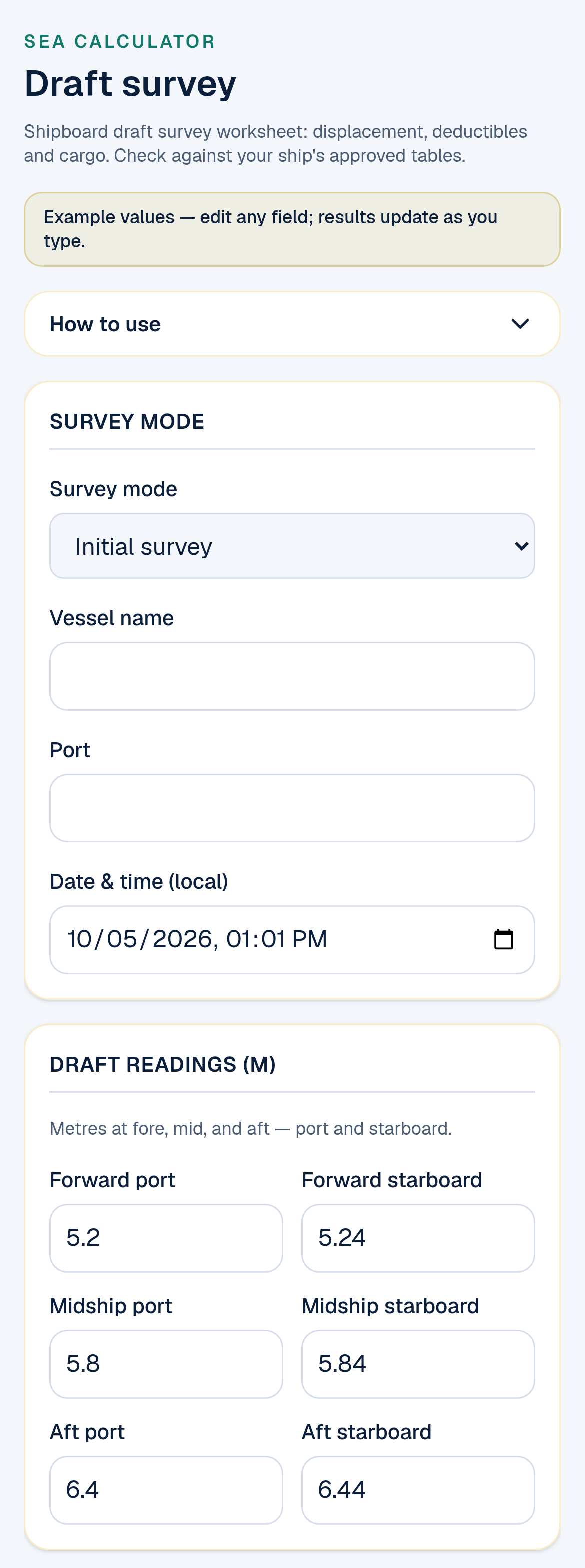
The top of the draft survey page: choose the survey mode, then enter your six readings. These are example values.
1. Choose the survey mode
Pick Initial survey (before cargo work), Intermediate or Final survey. Add the vessel name, port and the local date and time for your report.
2. Enter the six draft readings
Type forward, midship and aft drafts for port and starboard, in metres. The tool averages each pair. If port and starboard differ by more than 5 cm, it shows a warning. If they differ by more than 20 cm, it stops and asks you to check your readings. That's a useful catch for a misread mark or a ship with a real list.
3. Vessel and mark distances
Enter LBP, lightship and the dock water density you measured with your hydrometer. Then, for each set of marks, choose which side of the perpendicular (or midships) the mark is on and type the distance in metres. The tool works out the length between marks for you, and you can override it if your ship's data gives a different figure.
There's also a Keel plate thickness (deducted) box. It starts at 0. If your ship's draft marks are read from the bottom of the keel and your hydrostatic table is moulded, type the keel plate thickness in metres as a positive number, for example 0.02. The tool takes it away from the drafts, as standard draft-survey practice does, and shows it in the working as Keel plate deducted. Two centimetres matter: at a TPC of 55, that's more than 100 tonnes.
The page reminds you: "Check which side the mark is on. Other tools may use the opposite sign." Take that seriously. Mark positions are the most common source of a wrong draft survey.
4. Hydrostatic data
You have three choices:
- Paste your ship's hydrostatic table from Excel or a PDF (draft, displacement, TPC, LCF, MTC). The tool interpolates at the quarter mean and at half a metre above and below it for the MTC values. If those drafts fall outside your table, it refuses to guess and asks you to extend the table.
- Type the one row you need by hand: table draft, displacement, TPC, LCF (positive aft) and the two MTC values.
- Tick the example table to practise. It's a made-up Supramax table, not a real ship.
5. Deductibles
Add a row for each tank, or each group of tanks: ballast, fresh water, HFO, MGO, lube oil or other. Type the weight in tonnes, or untick the box and enter volume × density. There's also an Other (lump sum) line. The total appears at the bottom.
6. Read the result, open the working, save
The Result panel shows true trim, hog or sag, QM draft, displacement at QM, both trim corrections, final and net displacement, total deductibles, and the constant (initial survey). In an intermediate or final survey it also shows the deadweight and the cargo loaded, or cargo discharged if the ship has come up. Tap Working to see every line, from the six readings to the cargo figure, just like a survey sheet.
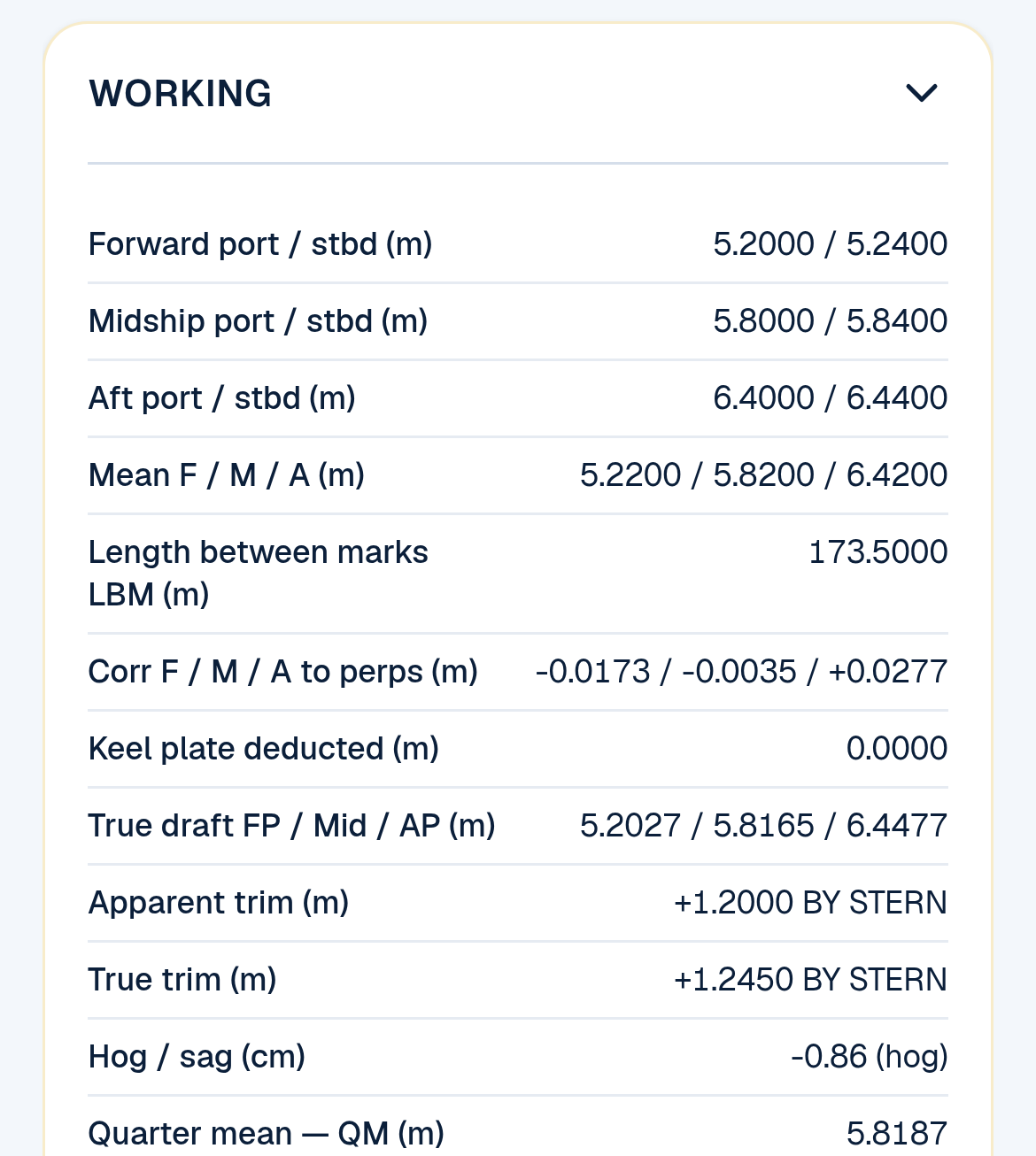
The first half of the Working panel: from the readings to the quarter mean (example figures).
Then:
- Save initial survey on this device. The tool keeps the initial survey's constant and net displacement, and uses them when you switch to Final. The cargo is then the difference between the net displacement now and the net displacement at the initial survey. Enter your Book cargo (B/L) to see the difference from the bill of lading. If you haven't saved an initial survey, you can type the constant from your initial survey by hand instead. The tool says when it is using your typed constant, and a typed constant takes the place of the saved one.
- Print report gives you a clean sheet with the full working (plus a comparison table once you've saved surveys) and blank lines for the Chief Officer and the surveyor to sign.
- Save as image downloads a picture of the results you can send.
- Clear all wipes the form and saved surveys from your device (it asks first).
EXAMPLE: a draft survey, worked through
EXAMPLE FIGURES. These are the example values that open on the Maritime Match page, with one change: ballast 14,600 t instead of the page's 15,000 t, so the constant comes out at a realistic figure. They are for practice only and are not from a real ship.
| Item | Example input |
|---|---|
| Drafts F / M / A (port / stbd) | 5.20 / 5.24 · 5.80 / 5.84 · 6.40 / 6.44 m |
| LBP | 180 m |
| Marks | Fwd 2.5 m aft of FP · Mid 0.5 m aft of midships · Aft 4.0 m fwd of AP |
| Dock water / table density | 1.018 / 1.025 t/m³ |
| Keel plate thickness | 0 (none deducted) |
| Hydrostatic row | 5.82 m · 24,342 t · TPC 55.20 · LCF 1.22 m aft · MTC 755 / 732 t·m |
| Deductibles | Ballast 14,600 · FW 200 · HFO 500 · MGO 80 · LO 20 · other 50 = 15,450 t |
| Lightship | 8,500 t |
Here's what the tool works out:
- Means: forward 5.22 m, midship 5.82 m, aft 6.42 m. Apparent trim 1.20 m by the stern.
- Length between marks: 180 − 2.5 − 4.0 = 173.50 m.
- Corrected to the perpendiculars: FP 5.2027, Mid 5.8165, AP 6.4477 m. True trim 1.2450 m by the stern. Hog 0.86 cm.
- Quarter mean: (5.2027 + 6 × 5.8165 + 6.4477) ÷ 8 = 5.8187 m.
- Displacement at QM: the QM is 0.13 cm below the table draft, so 24,342 − 7.16 = 24,334.84 t (0.13 cm × TPC 55.20; the tool carries more decimals than it shows).
- Trim corrections: first 1.2450 × 1.22 × 55.20 × 100 ÷ 180 = +46.58 t. Second 50 × 1.2450² × (755 − 732) ÷ 180 = +9.90 t. Corrected for trim: 24,391.32 t.
- Density: 24,391.32 × 1.018 ÷ 1.025 = 24,224.75 t final displacement.
- Net displacement: 24,224.75 − 15,450 = 8,774.75 t.
- Constant: 8,774.75 − 8,500 = 274.75 t. The Working panel also shows the deadweight: 24,224.75 − 8,500 = 15,724.75 t.
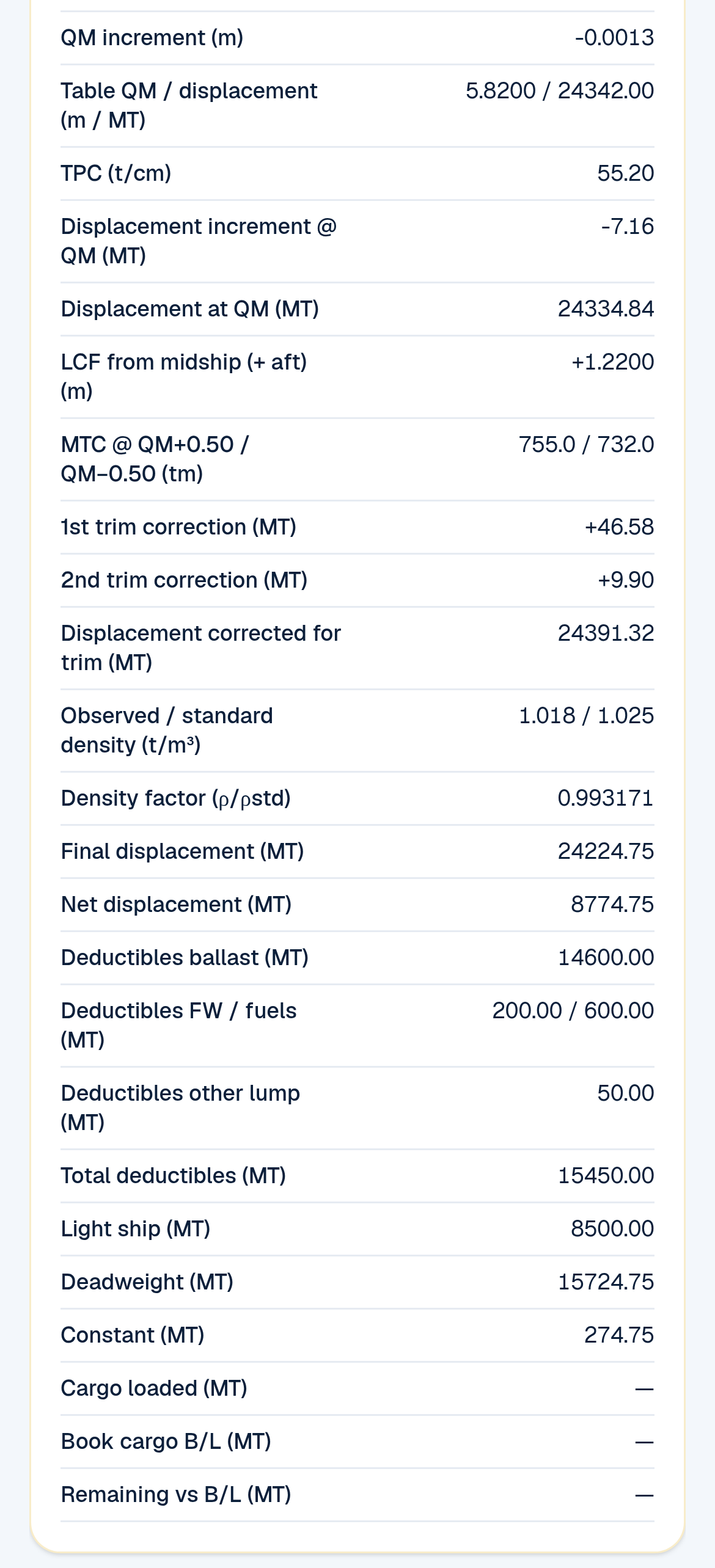
The second half of the Working panel: from displacement to the constant (example figures).
Part 2: The Grain Stability Check, step by step
Open maritimematch.ph/sea-tools and tap Grain Stability Check. Like the draft survey, it opens with example values so you can see a full check first.
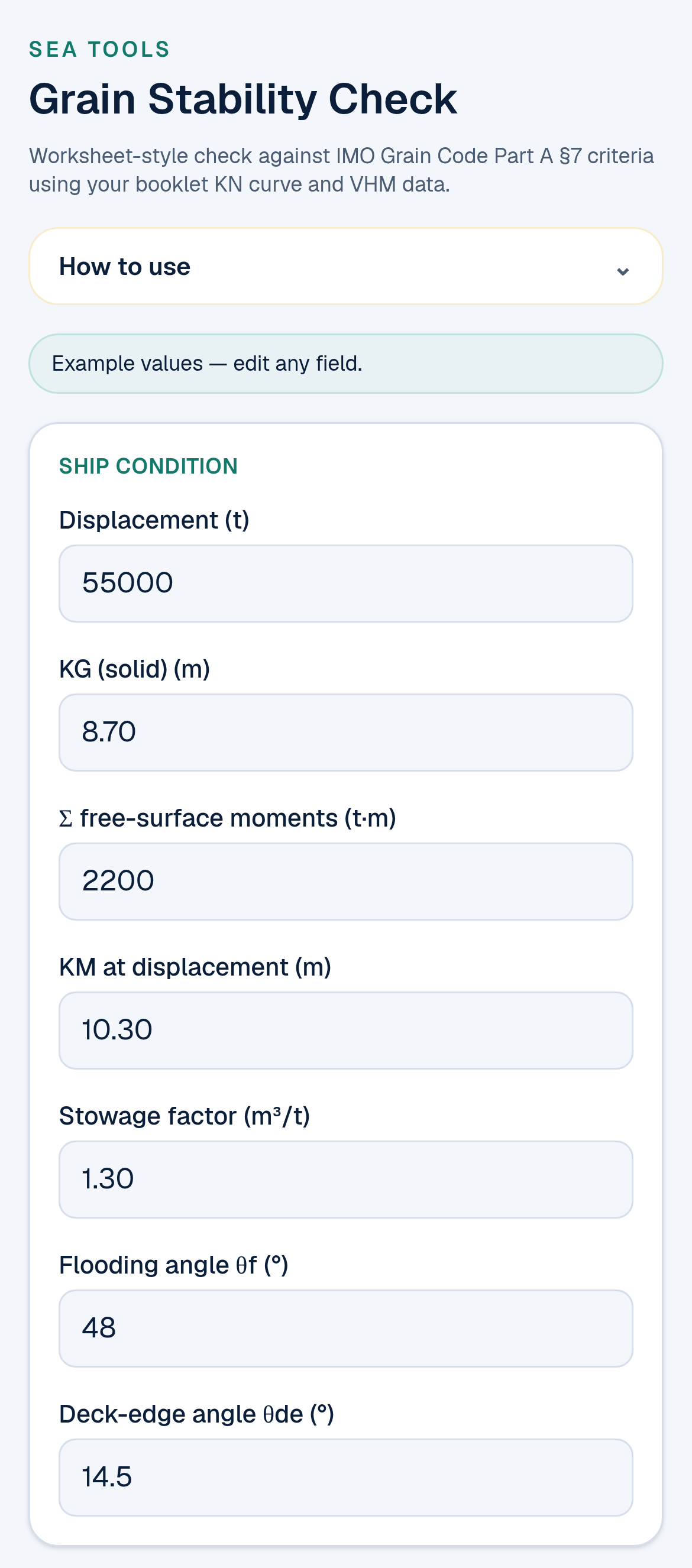
Ship condition: take these from your loading condition and the grain booklet. These are example values.
1. Ship condition
From your loading condition, enter:
- Displacement, KG (solid), the total free-surface moments of your slack tanks and KM at that displacement.
- The stowage factor of your grain (m³/t). The tool warns you if it's outside the usual 0.9–2.5 range.
- The flooding angle θf and the deck-edge angle θde from your booklet.
2. KN curve
Type the KN values for your displacement at the 11 angles shown: 0°, 5°, 10°, 12°, 15°, 20°, 25°, 30°, 40°, 50° and 60°. Take them from the cross curves in your stability booklet, at the displacement you entered.
3. Holds and the allowable heeling moment table
For each hold, choose Full or Partly (filled) and type its VHM (m⁴) from the grain booklet. Leave the VHM blank to leave a hold out, and add more holds if you need them.
By default the tool applies the Grain Code's vertical-shift factors: × 1.06 for full holds and × 1.12 for partly filled holds. Applying them to every hold is on the safe side. Some grain booklets list VHMs with these factors already included. If yours does, tick "Booklet VHMs already include vertical-shift factors (1.06 filled / 1.12 partly)" so they aren't added twice. Your booklet's notes tell you which applies.
If your booklet has an allowable heeling moment table against KG, type the KG rows and the matching tonne-metre values. The tool sorts the rows and checks for duplicates. It won't guess outside your table: if your fluid KG is above or below the table's KG range, this check shows FAIL with a "no extrapolation" note, so take the right figure from your booklet.
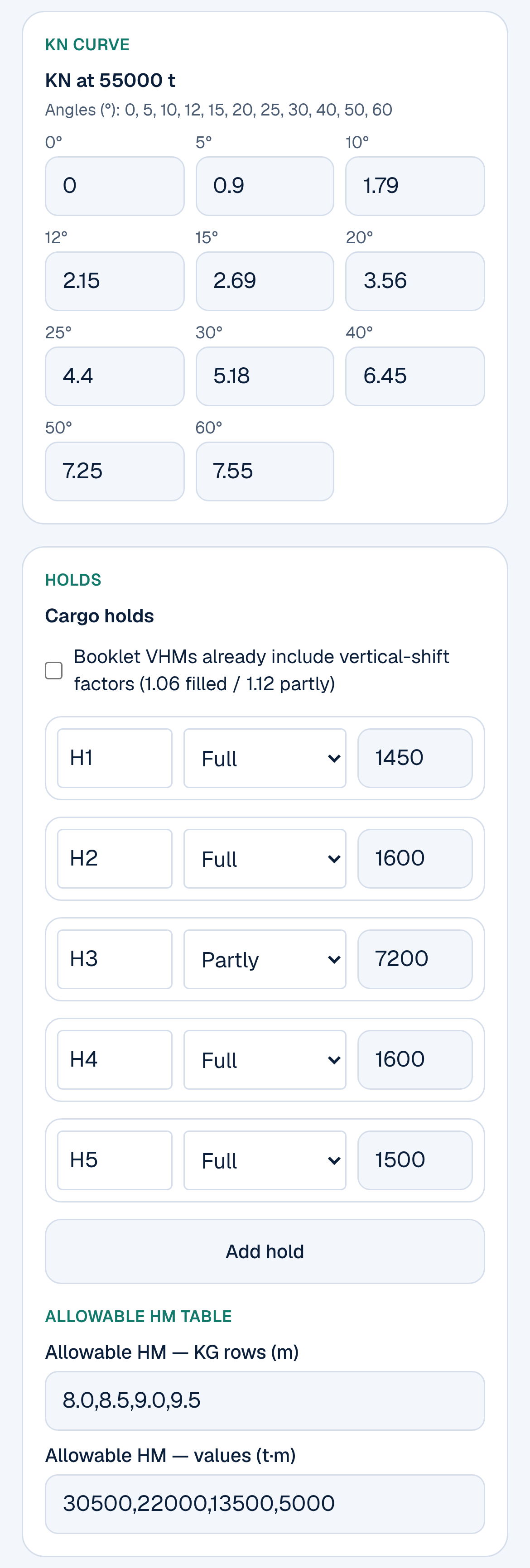
KN curve, holds and allowable heeling moment table (example values).
4. Read PASS or FAIL
You get an overall PASS — all criteria met or FAIL — review criteria below, then one line per check:
- Angle of heel must be no more than 12°, or the deck-edge angle if that is smaller.
- Residual area between the GZ curve and the heeling arm must be at least 0.075 m·rad. The tool tells you which angle it integrated to: 40°, the flooding angle, or the angle of maximum difference.
- GM₀ (fluid) must be at least 0.30 m.
- Grain heeling moment vs table (only if you entered a table) must be no more than the allowable moment at your fluid KG.
The first three come from IMO International Grain Code Part A, section 7.1. The table check uses your own ship's booklet.
Below the checks, Calculation detail shows KG (fluid), GM, the grain heeling moment, λ₀ and λ₄₀, the angle of heel and the residual area. You also get warnings, such as a heel above 10° or more than two partly filled holds. Print worksheet gives you a clean page with all inputs and results.
EXAMPLE: a grain stability check, worked through
EXAMPLE FIGURES. These are the example values that open on the Maritime Match page. They are for practice only and are not from a real ship's booklet.
| Item | Example input |
|---|---|
| Displacement · KG · ΣFSM · KM | 55,000 t · 8.70 m · 2,200 t·m · 10.30 m |
| Stowage factor · θf · θde | 1.30 m³/t · 48° · 14.5° |
| KN (0°…60°) | 0 · 0.90 · 1.79 · 2.15 · 2.69 · 3.56 · 4.40 · 5.18 · 6.45 · 7.25 · 7.55 m |
| Holds (VHM, m⁴) | H1 1,450 · H2 1,600 · H3 partly filled 7,200 · H4 1,600 · H5 1,500 |
| Allowable HM table | KG 8.0 / 8.5 / 9.0 / 9.5 m → 30,500 / 22,000 / 13,500 / 5,000 t·m |
Here's what the tool works out:
- KG (fluid): 8.70 + 2,200 ÷ 55,000 = 8.74 m. GM₀ = 10.30 − 8.74 = 1.56 m (needs at least 0.30 m: PASS).
- Adjusted VHM: (1,450 + 1,600 + 1,600 + 1,500) × 1.06 + 7,200 × 1.12 = 14,583 m⁴.
- Grain heeling moment: 14,583 ÷ 1.30 = 11,217.69 t·m.
- Heeling arm: λ₀ = 11,217.69 ÷ 55,000 = 0.2040 m. λ₄₀ = 0.1632 m.
- Angle of heel: where GZ meets the heeling arm, 7.22° (limit 12°: PASS).
- Residual area: integrated to 40° (the lowest of the three limits here), 0.2449 m·rad (needs at least 0.075: PASS).
- Allowable moment at KG 8.74 m from the table: 17,920 t·m. 11,217.69 is less than that: PASS.
Result: PASS, all criteria met.
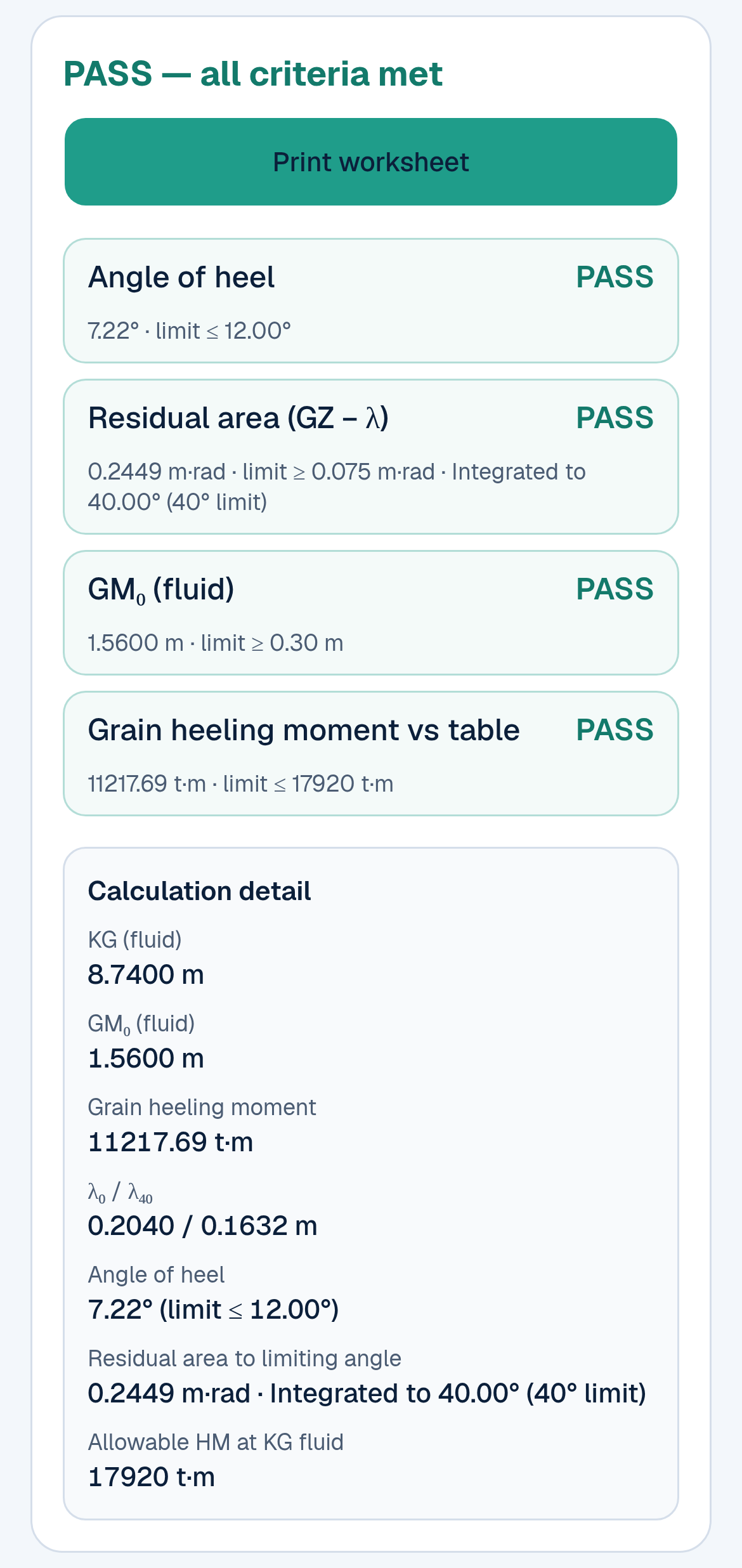
The Grain Stability Check result for the example values: PASS on all four checks.
Where your figures are saved
Both tools save what you type in your phone's browser, on that device only. The draft survey also keeps your saved Initial, Intermediate and Final surveys there, so the final survey can use the initial survey's figures. Nothing is sent to an account, so you don't need to sign up. It also means another phone, or another browser on the same phone, won't see your figures. Use Print or Save as image if you need to keep or share a copy.
What these tools are, and what they are not
These are worksheets that help you check your own figures and understand each step. Please keep these in mind:
- The draft survey page says: "Check against your ship's approved tables."
- The Grain Stability Check says: "Check against your ship's approved Grain Loading Manual and stability booklet. Not a replacement for approved software."
- Your results are only as good as the data you enter. Use your ship's own hydrostatic table, KN curves and VHMs, not the example ones.
- The Master, the Chief Officer, the ship's approved stability documents and loading computer, and the independent surveyor have the final say. If the tool and your approved figures disagree, your approved figures win. Then find out why.
- The Grain Stability Check covers the grain criteria only. It doesn't check trim, hull strength, or cargoes other than grain.
The other free Sea Tools
At maritimematch.ph/sea-tools you'll also find:
- Sea Calculator: seven more shipboard calculators besides the draft survey: ETA & distance, gyro & compass error, bunker & fuel, currency, true wind, unit converter, and FWA & DWA.
- ORB Entry Helper: helps you draft MARPOL Annex I Oil Record Book Part I lines and run a self-check before you copy them into the ship's record book.
- MedDeck: a practical medical reference for seafarers.
- Cook Hub: smart menu planning for the galley.
All are free for seafarers.
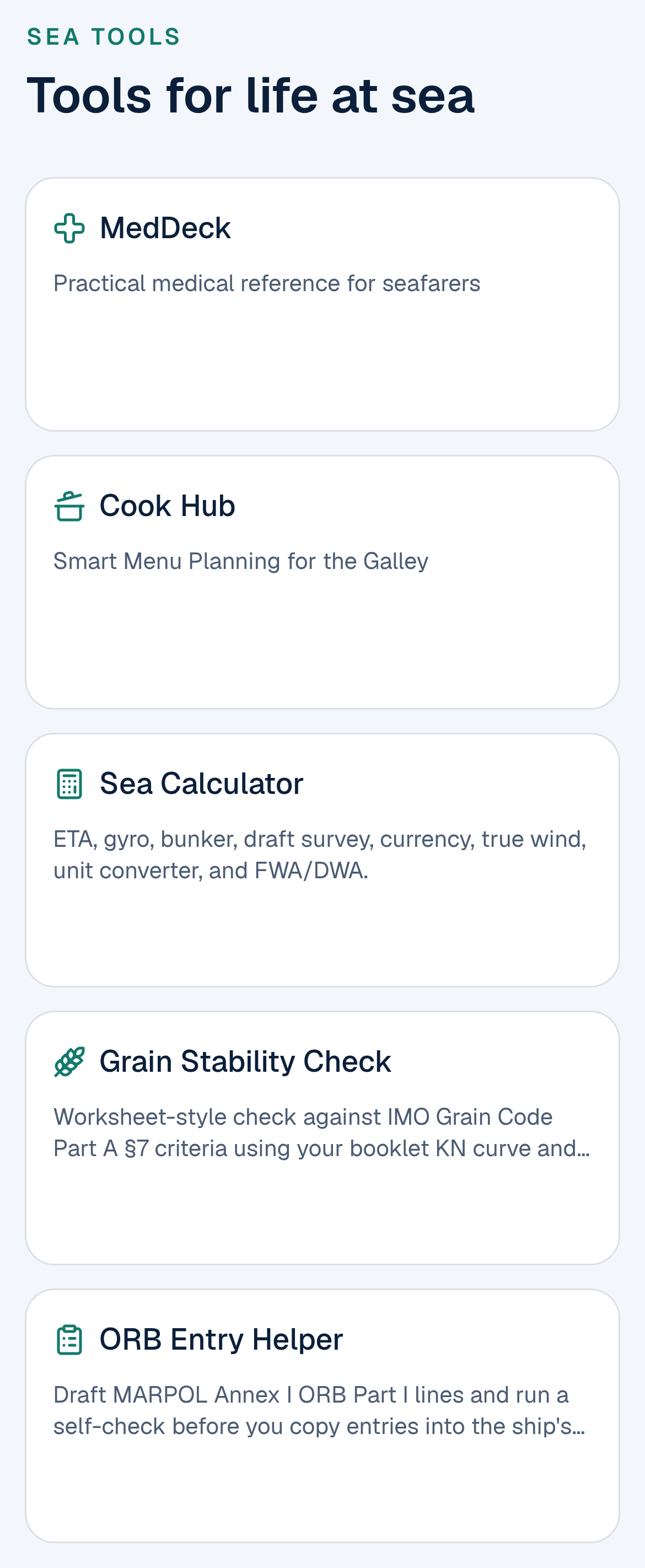
The Sea Tools page: five free tools for life at sea.
Frequently asked questions
Are the Draft survey and Grain Stability Check free? Yes. Both are free, with no sign-up and no payment.
Do I need an account? No. You can use both tools fully without logging in. Your entries stay on your own device.
Can I use the result as my official draft survey or grain stability calculation? No. They are worksheets to help you work out and check your figures. Always check against your ship's approved hydrostatic tables, stability booklet, Grain Loading Manual and loading computer, and follow your company's and the surveyor's procedures.
Does the draft survey work for discharging as well as loading? Yes. Run an Initial survey before cargo work and save it, then a Final survey after. The tool works out the cargo from the difference in net displacement. If the ship has come up, the Result shows Cargo discharged, and the B/L line becomes Balance vs B/L after discharge.
My ship's marks are forward of the forward perpendicular. Can I enter that? Yes. Each set of marks has a side picker, for example "Forward of forward perpendicular", and you type the distance as a positive number. Check the side carefully against your ship's draft-mark plan.
Where do I find the VHM and KN values for the grain check? In your ship's grain loading booklet (Grain Loading Manual) and stability booklet. The VHM is listed for each hold, often for filled and partly filled conditions. KN comes from the cross curves at your displacement.
What is the difference between 1.06 and 1.12? They are the Grain Code's allowance for the grain surface also moving up and down, not just sideways. 1.06 is for filled holds and 1.12 for partly filled holds. The tool applies them by default, which is on the safe side. If your booklet's VHMs already include them, tick the box so they aren't added twice.
What should I type in the keel plate box? Only the keel plate thickness, in metres, as a positive number (for example 0.02), if your ship's draft marks are read from the bottom of the keel and the hydrostatic table is moulded. The tool deducts it. Leave it at 0 if your marks already match the table. If you're not sure, check your ship's draft-mark plan or hydrostatic booklet.
What if the check shows FAIL? Look at which criterion failed and recheck your inputs first: KN at the right displacement, the stowage factor, and each hold's state and VHM. Then talk to the Master and Chief Officer about your options, such as changing the loading plan, filling a hold, securing the grain surface, or adjusting ballast, following your Grain Loading Manual.
Does it work on my phone? Yes. Both pages are built for a phone screen and work in your normal browser.
Is Maritime Match a manning agency? No. Maritime Match is a portal only, and seafarers never pay fees.
Try it on your next cargo watch
Open maritimematch.ph/sea-tools. Run the example in each tool once, so you know where everything is. Then try it with your own ship's figures next to your usual survey sheet, and see if you get the same numbers.
For background: the grain criteria come from the IMO International Code for the Safe Carriage of Grain in Bulk (International Grain Code), Part A section 7 and Part B. The draft survey uses the corrections found in standard draft-survey practice, such as the UNECE draught survey code for coal cargoes. Maritime Match is not affiliated with or endorsed by IMO or UNECE.